Account & plans
Connect Discord or add a webhook
Delivery channels are managed on the Webhooks page. Onboarding creates a private Discord channel for you with Connect Discord, and that channel becomes the default every monitor inherits. Add adds more: another Discord channel, Slack, Telegram or Pushover, each with a name, a platform and its URL. Email and Dashboard only are built-in deliveries you can choose per monitor.
Before you start
- An Eventory account. For Discord, a server you can add the Eventory bot to, or the private channel from onboarding.
Steps
Connect Discord during onboarding
The first time you sign in, onboarding offers Connect Discord. It verifies your Discord account and creates a private alert channel for you; the screen says Channel ready when it is done. That channel is saved as your default delivery.
Skip for now leaves you on Dashboard only: alerts appear in the app and nowhere else until you add a channel.
Note: If the Discord step says it lost the session or could not verify, click Connect with Discord again. It happens when the browser blocks the popup the first time.
Open the Webhooks page
Webhooks in the sidebar lists every delivery of the workspace: Name, Platform, when it was Created and which one is the Default. The two built-in rows are email, sent to your account email, and the dashboard, shown on your dashboard and in the app.
An empty table with no error means you have not added any yet. A page that will not load shows an error; do not read a failed load as an empty list.
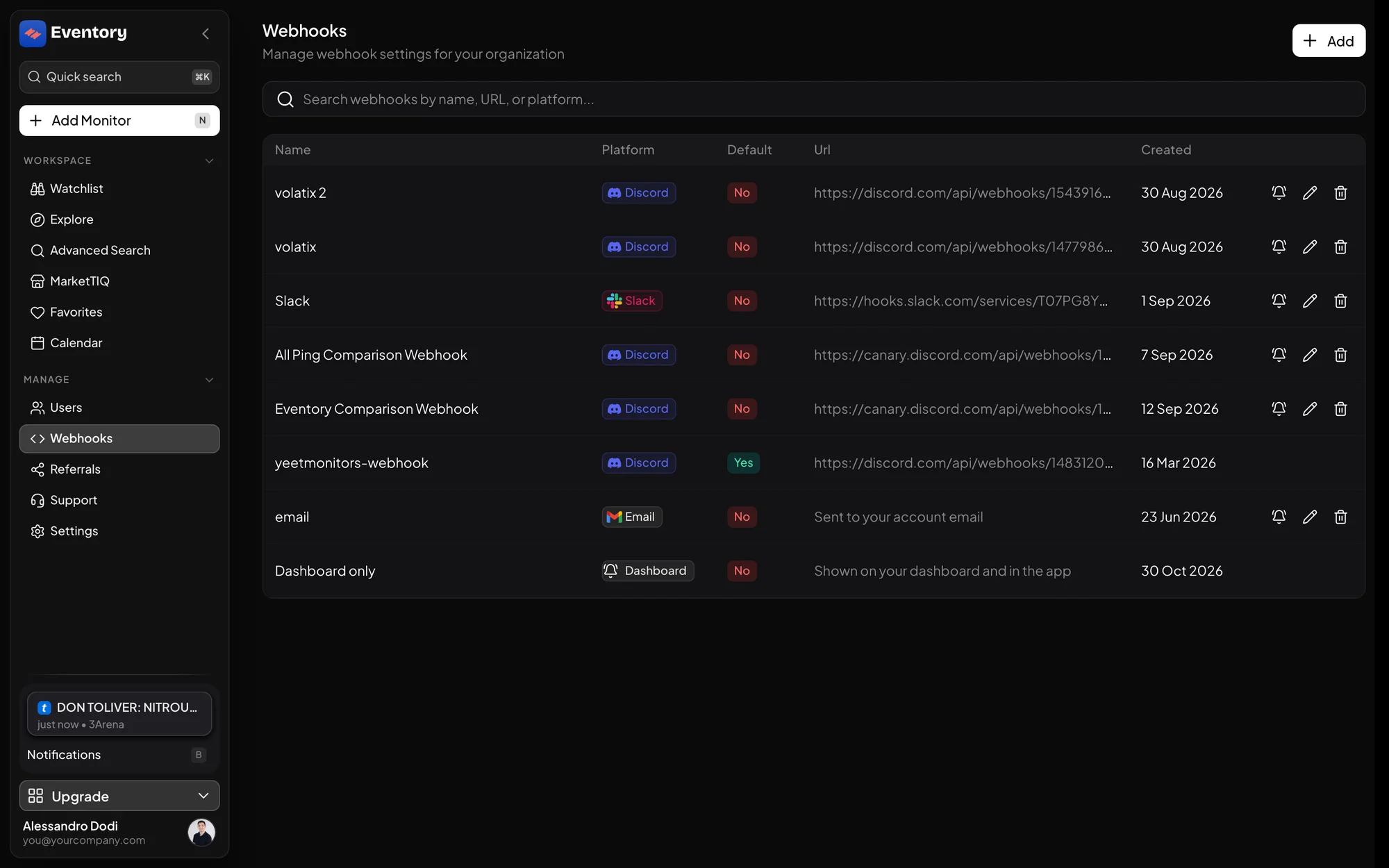
The Webhooks page: Name, Platform, Default, Url and Created, with the built-in email and Dashboard only rows at the bottom. Add a webhook
Click Add, give it a Webhook Name, pick the Platform, Discord, Slack, Telegram or Pushover, and paste the URL in Webhook. The platform decides the message format, so a Discord channel gets an embed and Slack gets blocks. Set as default webhook makes it the channel new monitors inherit.
Name the channel after who reads it, not where it is: #floor-team ages better than #webhook-2.
- Discord: paste the channel's webhook URL from the channel settings.
- Slack, Telegram, Pushover: paste the URL each service gives you.
- Email and Dashboard only are built in and need no URL.
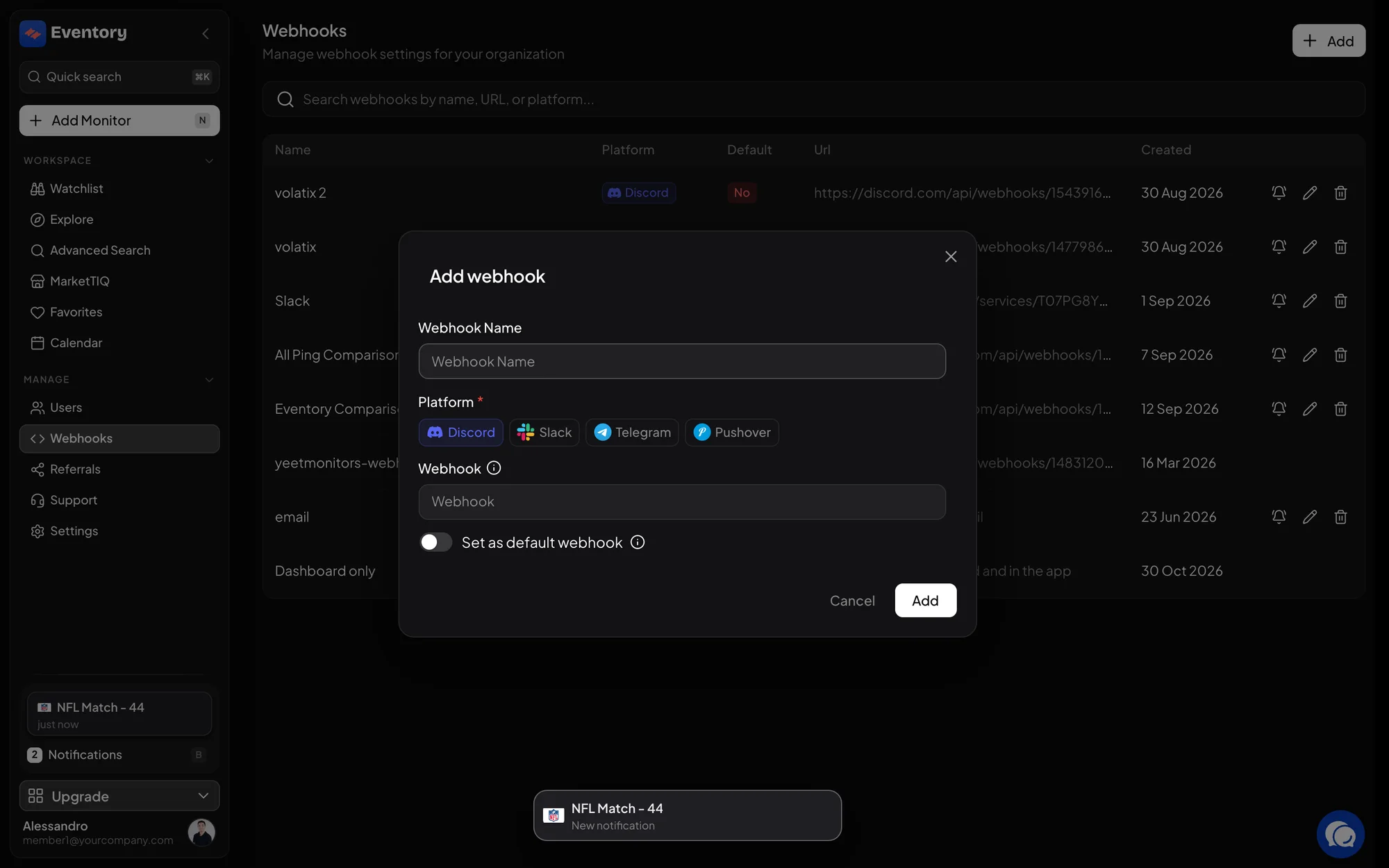
Add webhook: a name, the Platform, the URL, and Set as default webhook. Set the default
Mark one delivery as Default. Every monitor without an explicit delivery sends there, which is most of them, so the default should be the channel someone is actually watching.
Changing the default moves every monitor that relies on it at once. Monitors with their own delivery are not affected.
Point monitors at the right channel
In a monitor's editor, Delivery lists every row of this page. Choose one for the monitor, or for a single filter set when one event should feed two channels. Where alerts are delivered covers the routing rules.
Use Edit webhook to rename or repoint a delivery; the monitors that use it follow, so rotating a leaked URL is one edit, not a Watchlist sweep.
Mentioning people: roles
A Discord delivery can mention roles. Add the role on the Users page under Roles, with its Discord ID from your server, and pick it in the monitor's Roles to ping. The alert then pings the role, so one channel can carry several teams' events without everyone reading everything.
Testing a channel
Point one noisy monitor at the new channel and wait for its next alert, then compare it with the Notifications page. If the alert is in the app and not in the channel, the webhook is wrong; if it is in neither, the monitor is.
The private channel from onboarding
It lives in Eventory's Discord server, not in yours, and only you can see it. It is the fastest way to get alerts on day one. When you later add a channel in your own server, make that one the default and keep the private one as a personal fallback.
Frequently asked questions
Can I have more than one Discord server?
Yes. Each webhook URL is one channel in one server; add as many as you need and pick per monitor.
Can alerts go to my own system?
Through the API's notifications WebSocket, which carries every alert as JSON: the event, the site, the sections that changed with quantity and price, and a link. See the API documentation.
Can alerts go to email?
Yes. The email delivery is one of the built-in rows and can be chosen per monitor. It is slower than a chat channel and better suited to Trackers than to restock alerts.
Why did my webhooks disappear?
Usually the page failed to load rather than the rows being gone. Reload; if the error persists, contact support from the Support page.
Next steps
Start monitoring
Pick a plan, add your events and let Eventory tell you the moment tickets come back.
API documentation: the reference for developers, next to these guides.