Monitors
Choose what a monitor reacts to
The Monitoring method field decides what a monitor reacts to. Restock fires when the number of tickets available goes up; Stock decrease fires when it goes down. The method also decides which size filter applies: Min stock increase for a Restock monitor, Min stock decrease for a Stock decrease monitor, both counted in tickets. Price moves are not a monitoring method: a price band narrows which listings count, and a Tracker watches a price metric over time.
Before you start
- A monitor on an event, added as in Add a monitor.
Steps
Open the filter set and find Monitoring method
On the Watchlist, open a row for editing, or set the field while you are adding the monitor. Monitoring method sits in the filter set with the rest of the rules.
Not every site offers both methods. When a site only reports restocks the field is hidden and the monitor is a restock monitor, because there is nothing to choose.
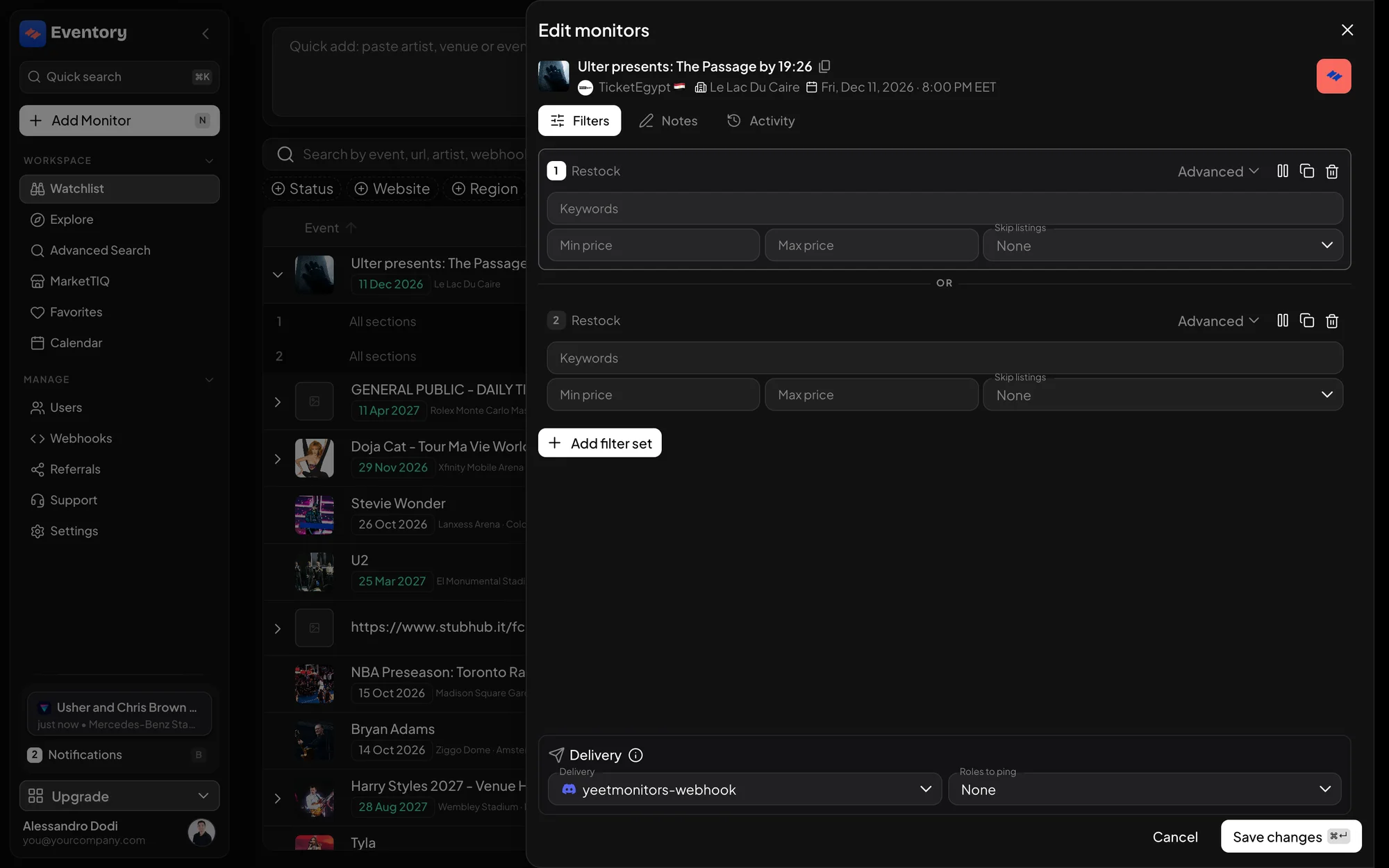
The Edit monitors dialog: each filter set card names its monitoring method in the title, Restock here, with Advanced for the rest of the fields. Restock: tickets appeared
Restock, stored as a stock increase, is the default and the one most people want. It fires when the number of tickets available goes up: a release, a return, a cancelled order going back on sale, a hold being lifted.
Pair it with Min stock increase to ignore trivial restocks. The field counts tickets, not seconds: set 50 and a restock of 10 tickets is skipped while a restock of 50 or more pings you.
Stock decrease: tickets disappeared
Stock decrease fires when tickets vanish. It is the method for reading demand rather than catching inventory: a sudden drop tells you a block just sold, which is often the signal that an event is about to tighten.
Its size filter is Min stock decrease, and it works the same way: the number of tickets that have to disappear at once before you hear about it.
Watching prices instead
Neither method reacts to a price moving on its own. Min price and Max price decide which listings count when stock changes, so a Restock monitor with Max price 120 tells you about tickets appearing under 120 and stays quiet about the rest.
To be told when the market itself reprices, use a Tracker on a price metric such as average sold price or get-in price. It watches Eventory's collected data rather than the site, and fires when the value crosses your threshold. See Create a Tracker.
- Monitor with a price band: tickets appeared, within the prices you would pay.
- Tracker on a price metric: the average or get-in price crossed a value.
Why the fields change when you change the method
Saving a monitor clears whatever does not belong to its method, so the form only ever shows the fields that can take effect. A minimum decrease on a Restock monitor would do nothing, so it is not offered, and a stale value cannot be left behind to confuse you later.
This also matters for bulk edits: a field is only offered for a selection when every selected row can use it. Picking rows with different methods narrows the list of editable fields, which is the form telling you the truth rather than getting in your way.
Min stock increase is not Min stock
These two are the most commonly confused fields in Eventory and they measure different things. Min stock increase is the size of the change: how many tickets have to appear at once. Min stock is the level: how many tickets the event has to have in total for an alert to be sent.
An event sitting on 400 tickets that releases 3 more has a big level and a tiny change. Whether you want that ping depends on which of the two you set, so set the one that matches your question and leave the other empty.
Older monitors with an average price method
Monitors created in earlier versions could use Avg price increase or Avg price decrease as a method, with a single average-price threshold instead of the price band. Those monitors keep working and keep their method, and the field still shows it on them so it can be read and changed.
New monitors do not offer them. If you relied on one, the replacement is a Tracker on the same price metric, which also reaches the resale and primary markets the monitor could not see.
Which method to use when
A practical mapping from what you are trying to do to the setting to pick.
- Buying a hard event: Restock, with a Min stock increase that matches the quantity you need.
- Reading demand on an event you already hold: Stock decrease.
- Only hearing about tickets you would pay for: either method, with Max price set.
- Waiting for a market to soften or run up: a Tracker on get-in or average price.
Frequently asked questions
Can one monitor use both methods?
One filter set has one method, but a monitor can have several filter sets. Add a second set with the other method to watch both on the same event.
Why is the Monitoring method field missing on my monitor?
That site only reports restocks, so the monitor is a restock monitor and there is nothing to choose. The field appears on sites that also report decreases.
Does Restock catch a price drop too?
No. Restock reacts to the quantity available, not the price. Set a price band to limit which listings count, or use a Tracker to watch the price itself.
What happened to Avg price increase and Avg price decrease?
They are no longer offered on new monitors. Existing monitors that use them keep working. A Tracker on a price metric is the replacement.
Next steps
- Filter a monitor by section, row and price
- Cut down alert noise
- Create a Tracker on an event or artist
Start monitoring
Pick a plan, add your events and let Eventory tell you the moment tickets come back.
API documentation: the reference for developers, next to these guides.