Market data
Save events to favorites and lists
Save on an event page puts the event in your favorites. The Favorites page shows them all, split into Upcoming and Past, with a search box and a sort, and lets you organise them into named lists with New list. A list can be shared: Share creates a link anyone can open, and turning sharing off invalidates it. Favorites are personal to your account, unlike monitors, which belong to the workspace.
Before you start
- A signed-in account. Favorites are per user.
Steps
Save an event
On an event page, click Save in the header. The icon fills and the event is in your favorites. Click again to remove it. Event cards on Discover and in search results have the same bookmark icon.
Saving does not monitor the event. It is a shortlist, not an alert; Track is the button for alerts.
Open the Favorites page
Favorites in the top bar or the sidebar opens the page. All favorites is the default view, with Upcoming and Past as the two groups, a Search by event, artist or venue box and a Sort.
Each card shows when it was added, Added today or Added yesterday for the recent ones, and has Track event to start monitoring it from here.
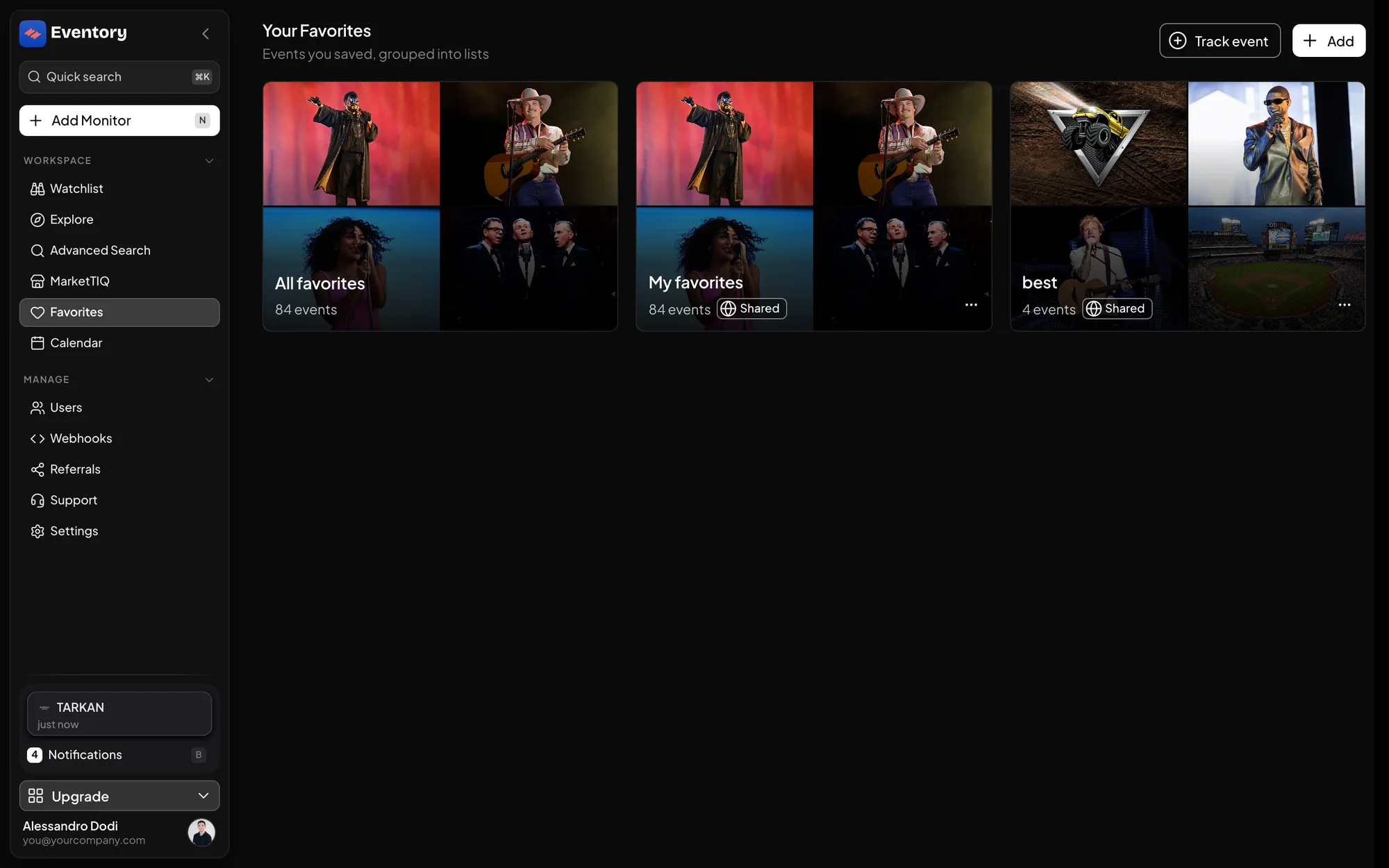
Your Favorites: All favorites and your lists as cards, with the event count and a Shared chip on the lists you shared. Create a list
New list asks for a List name and creates it. Add an event to a list from the event's menu on the Favorites page, or save it straight into a list from the event page's Save menu.
Lists work like folders of a shortlist: one event can be in several lists, and removing it from a list does not remove it from your favorites.
- Rename list and delete from the list's menu.
- A list says This list is empty until you add to it.
Share a list
Open the list, click Share and Create link. The link opens the list read-only for anyone, signed in or not, with the events and their current numbers. Copy share link copies it again later.
Turning sharing off makes the link stop working: a visitor sees that the link may have expired or the owner turned sharing off. Create a new link if you want to share again.
Favorites, monitors and Trackers
Three ways of keeping an eye on an event, for three jobs. A favorite is a bookmark: it costs nothing and alerts nobody. A monitor watches the ticketing site and alerts on restocks. A Tracker watches Eventory's metrics and alerts on a threshold.
A good routine is to favorite widely while researching, then promote the few that matter to monitors or Trackers. Track event on the Favorites card is that promotion in one click.
Sharing with clients
A shared list is a lightweight way to show a client what you are watching for them, with live numbers, without giving them a seat. It is read-only and carries no monitor information, only the events.
Because the link shows the live numbers, it stays useful after you send it: the client sees today's sales and prices, not the ones from the day you built the list. Turn sharing off when the engagement ends and the link goes dark.
Past events stay
An event that has happened moves from Upcoming to Past rather than disappearing. That is on purpose: a list of past shows with their final sales figures is a record of what a tour or a venue actually did, and a useful comparison when the next date is announced.
Frequently asked questions
How do I remove an event from my favorites?
Click Save again on the event page, or use the bookmark icon on its card. It leaves every list it was in at the same time.
Can I sort the Favorites page by event date?
Yes. Sort offers the event date and the date you saved it, and the search box narrows by event, artist or venue.
Are favorites shared with my team?
No. Favorites and lists are per account. Share a list by link if a colleague needs to see it.
Does a shared link show my monitors?
No. It shows the events in the list and their public numbers, nothing about your Watchlist.
Is there a limit to favorites?
No limit on favorites or lists.
Can I favorite an artist or a venue?
Favorites are events. For an artist, a discovery monitor is the way to follow new dates.
Next steps
Browse the events
Sales, prices and availability for the events on sale right now.
API documentation: the reference for developers, next to these guides.