Market Intelligence
Use the sale calendar
The calendar at /calendar shows when tickets go on sale: every presale and public sale, laid out as a week grid by hour, with the number of shows per day and per hour. Week, Agenda and Overview are the three views; Country, Monitored and Capacity filter it; Active hours hides the hours with nothing on sale. Add to my calendar exports a sale to Google, Apple or Outlook. It is part of Market Intelligence.
Before you start
- A signed-in account with Market Intelligence. Without it the calendar is a blurred teaser.
Steps
Open the calendar
Calendar in the sidebar opens the current week: one column per day with its show count, one row per hour, and each sale as a chip with the site's flag and a count when several shows open at once. The arrows move a week at a time, and the header counts the shows and dates in the week.
Quiet stretches are folded, for example 01:00-09:59 quiet, with Expand to open them, so the busy hours stay on screen.
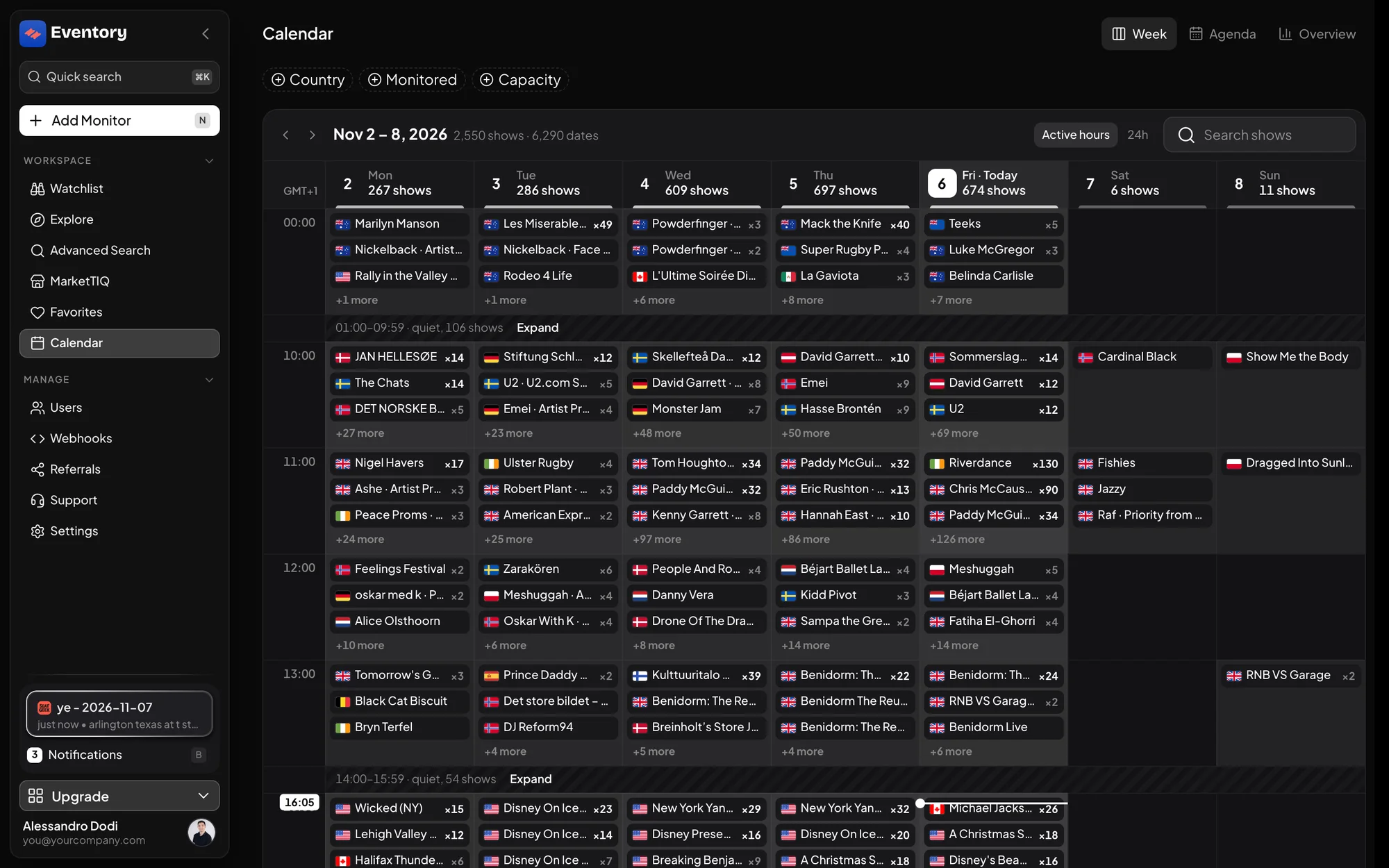
The calendar, Week view: one column per day, one row per hour, each sale as a chip with the site flag; quiet hours are folded. Filter to what you trade
Country limits to one country's sales. Capacity takes At least and At most bounds, so a club week and a stadium week are different calendars. Search shows finds one event by name.
Monitored keeps only the events already on your Watchlist, with Only mine for the ones you added yourself. Together they turn the calendar into your own on-sale schedule.
- Country: where.
- Capacity: how big, with At least and At most.
- Monitored and Only mine: your Watchlist's sales only.
Switch to Agenda and Active hours
Agenda lists the sales in time order instead of on a grid, which is what you want on the morning of a busy day, and Overview steps back to the month. Active hours, the default, hides the hours with no or very few sales; 24h shows the whole day.
Add a sale to your own calendar
On any sale, Add to my calendar exports the on-sale time to Google Calendar, Apple Calendar or Outlook, with the event link. It is the reliable way to be at your desk when the sale opens; a monitor tells you what happened, a calendar reminder tells you to be there.
Presales, public sales and what the calendar knows
An event can have several windows: a fan presale, a venue or card presale, and the public on-sale. The calendar lists each with its time; a sale with a known date and unknown time shows the day. Events whose date is not announced show Event date TBA.
Sale times come from the ticketing sites and change; the calendar reflects the latest the site published.
Reading a busy day
On an hour with dozens of sales the grid shows the first few and a count, for example 48 more. Click the hour to see every sale with its exact time, and open one to see the event with its capacity and get-in price, so you can rank the morning before it starts.
Calendar and monitors together
The calendar is for planning the week; a monitor is for the moment. A good routine: filter the calendar to Next 7 days and your markets on Monday, add the sales that matter to your own calendar, and add a monitor to each event before its sale opens so the first restock is already covered.
Frequently asked questions
Why is the calendar blurred for me?
It is part of Market Intelligence. A seat opens it; see Monitors or Market Intelligence.
Does the calendar show sales for every site Eventory monitors?
It shows the sales Eventory has sale dates for; the Markets filter lists which sites those are.
Can I get a notification when a sale opens?
Add the sale to your own calendar for the reminder. A monitor on the event covers what happens once it is open.
What does Monitored mean here?
Only the events that are on your workspace's Watchlist, so you see the on-sales of the events you already care about.
Next steps
- Add a monitor to an event
- Find the biggest movers with MarketTIQ
- Choose between Monitors and Market Intelligence
Get the full market data
Every sale, every price move and the sale calendar, for research and pricing.
API documentation: the reference for developers, next to these guides.