Market data
Find events with advanced search
The search page at /search finds events and artists by name and then narrows them by data. The filter sidebar bounds Ticketmaster availability, sold counts, get-in and average price and the public sale start, and the artist audience on Spotify, Instagram, TikTok and YouTube. Results can be sorted by any metric and shown as cards or as a table whose columns you choose, which turns the search page into a screener.
Before you start
- Nothing to search. Some result columns and sorts need a signed-in account.
Steps
Start from a name, or from nothing
Type an id, an artist, an event or a venue in the search box. The results update as you type. You can also leave the box empty and work only with filters, which is how you ask "show me every event with under 500 tickets left" rather than "show me this event".
The Events and Artists toggles switch what the results are. Artist results carry the audience metrics; event results carry the market metrics. The sidebar starts with Sort, Venue and Country, each with Include or Exclude, and Date, then the data filters below.
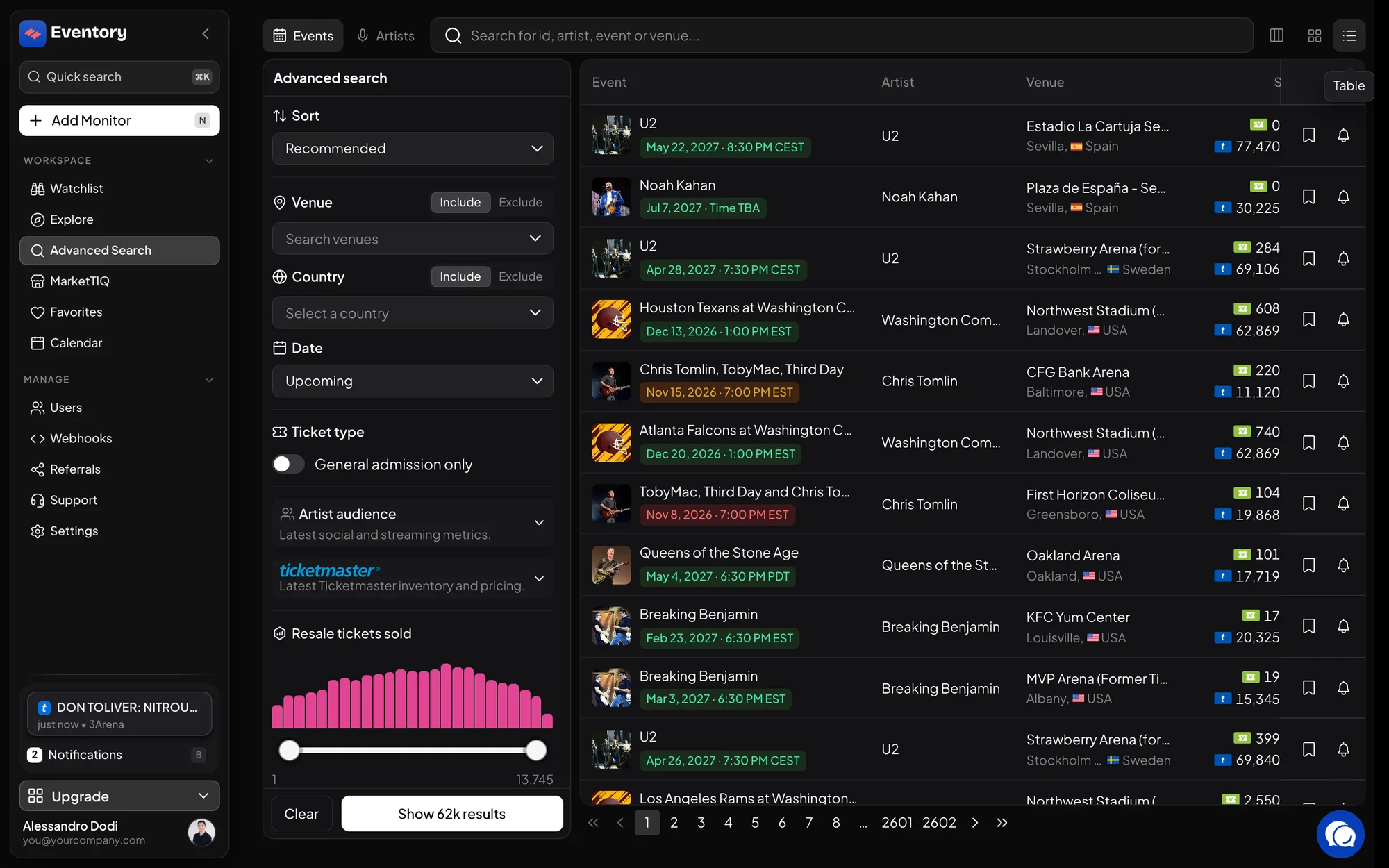
The search page: Advanced search filters on the left, results on the right in the table view, sorted by Recommended. Filter by Ticketmaster data
The Ticketmaster data section of the sidebar bounds the primary market. Each filter is a min and max pair; set only the side you care about.
These are the filters for finding supply: events with little primary stock left, events the box office is selling fast, events whose get-in is already high.
- TM primary available: tickets left at the box office.
- TM primary sold and TM primary sold 24h: how much has gone, and how fast.
- TM primary average price and TM primary get-in price.
- TM public sale start: find what goes on sale soon, or went on sale recently.
Filter by artist audience
The Artist audience section bounds the demand side: Spotify followers and monthly listeners, Instagram, TikTok and YouTube followers, and the total fans across platforms.
Combining the two sections is the point of the page. Low primary stock on an artist whose listeners are growing is a different event from low stock on one whose audience is flat, and the filters let you ask for exactly the first.
Sort, and switch to the table
Sort puts the results in the order of any metric, so the top of the list is the answer. The two icons beside the search box switch between cards and the table; use the table to compare many events at once, and the columns menu to choose which metrics show.
The table columns cover both markets: TM available, TM sold, TM get-in and the average prices on the primary side; Resale sold, Resale listings, Resale avg and Resale high sale on the resale side; plus artist fans, Spotify listeners, genre and career stage.
Use the advanced filter sheet when the sidebar is not enough
Resale tickets sold is a range with a histogram behind it, so you can see where most events sit before you drag the handles. General admission only, under Ticket type, restricts to events without seated sections. Signed-out visitors see the first results and a prompt; sign in to use the full set.
Open an event from the results to read it in full, or set a monitor straight from its page.
Search, MarketTIQ and Discover: which one to use
Three pages list events and they answer different questions. Search finds events by name or by a combination of filters you set. MarketTIQ ranks the market by what moved, with the trend widgets and the time windows built in. Discover is the editorial front page: what is on sale now and what is moving today, with nothing to configure.
Reach for Search when you know what you are looking for or can describe it as filters, and for MarketTIQ when you want the market to tell you where to look.
What the filters are reading
Filters run against a search index that is refreshed from the live data, so a number in the results can lag the event page by a little. The event page is always the fresher read; use the search page to find candidates and the event page to confirm.
Empty results with several filters set usually means the combination is too tight rather than that nothing exists. Loosen the side you are least sure about first.
Frequently asked questions
Can I save a search?
The filters live in the page URL, so bookmarking the page or sharing the link keeps them. A Tracker is the way to be told when an event starts matching.
Why does a result show no resale numbers?
The event is not listed on the resale marketplaces Eventory covers, or has not sold there yet. The Ticketmaster columns still fill when it is on Ticketmaster.
Can I search by venue?
Yes. Venue names are matched by the search box, and the venue column appears in the table view.
Is there a way to search from outside the app?
The API's search endpoint takes the same kind of filter expression and returns the catalog with its metrics. See the API documentation.
Next steps
Browse the events
Sales, prices and availability for the events on sale right now.
API documentation: the reference for developers, next to these guides.